View allAll Photos Tagged tutorial
NEW VIDEO! iPhone Photography Tutorial: Lippen - Surreal Portrait #04 #video
Check link on my Instagram profile for my channel. OR here’s for direct link to video: youtu.be/Ok9e_PtsUGU
Enjoy!
#surreal #icolorama #superimpose #lensdistortions #mextures #iphoneart #mobileart #iphoneonly
•
•
•
•
•
•
•
•
•
•
•
•
#instagram #mobileartistry #shotaward #artsick #fineartphg #expofilm #enter_imagination #graphicroozane #thecreativers #manipulationteam #moodcommunity #launchdsigns #milliondollarvisuals #imaginativeuniverse
#iphoneography #iphone #photography
Full color photo tutorial over on Moda Bake Shop:: www.modabakeshop.com/2011/02/sunkissed-squares.html
TUTORIAL on how I made this one. If you wanna try here is the orginal:
farm3.static.flickr.com/2040/1551982387_a2180917a9_o.jpg
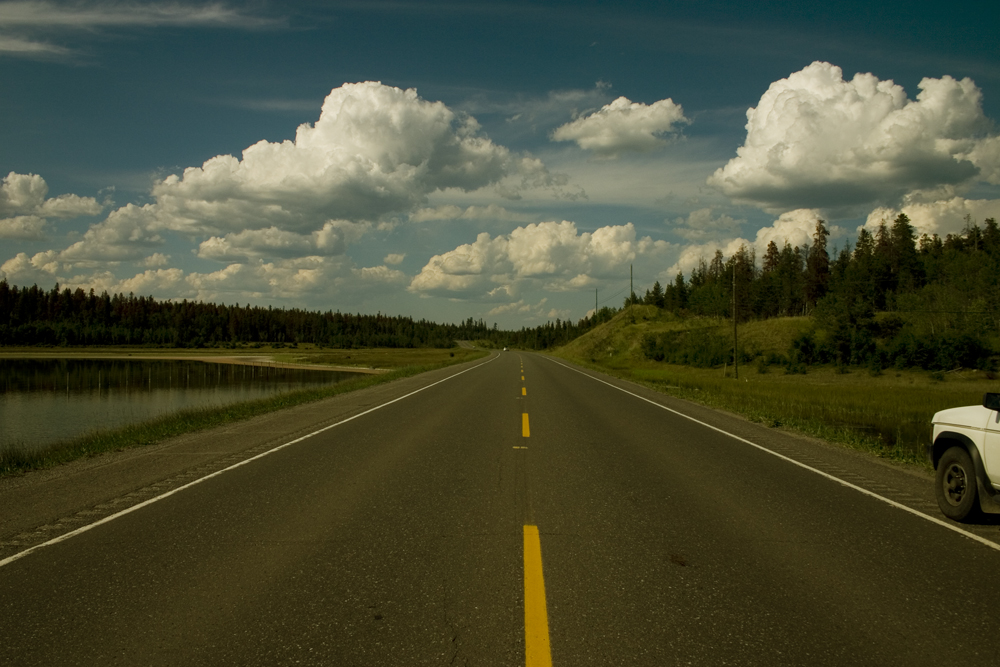
1. I´ll work with the road and the sky on 2 images, since the settings will be
different. Go to Image - Duplicate. Name it road.jpg (you can minimize it, since we will start working on one)
2. Image - Adjustment - variations... pick more yellow, OK
3. We will first work on the sky: Create new ajustment layer, Image - Adjustment - Levels, put in the numbers 21, 1.08 , 255
4. Duplicate the layer (right click on the layer, choose duplicate)
Name it Sky01
5. With Sky01 , go to levels again, put in 41 , 0.96 , 255
6. Image - Adjustments - hue saturation. In master take hue down to +4 and cyan is -9. It doesn´t do much, just little.
7. Duplicate the layer named Background, name it sky02 and drag it on top of the other layers. Go to Image -adjustment - Levels. Put in 74 , 1.14 , 197
Then some parts of the clouds get over exposed, so choose the erase tool, have the opacity on the eraser around 70% and the brush very soft, and erase the whitest. Then the layer underneath shows. Then put the opacity on the layer down to ca 74%.
8. I want it to be smoother, so I open the program "Neat image2 ( I bought it, but I think there is a free trial at www.neatimage.com) Now save this image (you can save it as psd if you wanna keep the layers, and then another one, f.x save as tutorial_sky.jpg
9. Open the tutorial_sky.jpg and minimize it, you can close the psd file
10. Now we´ll work on the road. Maximize the road.jpg
11. Duplicate the background layer, name the new layer road
12. Go to Image -Adjustment - Levels. Put in 21 , 1.10 , 199
13. Go to Image - Adjustments - Brightness Contrast. Put in +53 in Brightness and +80 in Contrast.
14. I think the road itself is to yello, but I like the other colors. Duplicate this layer you named Road. Name it Road02
15. Go to Image - Adjustments - Hue Saturation. Choose, Yellows and take the saturation down to - 75
16. Go to Image -Adjustment - Levels. Put in 0 , 1.08 , 172
17. On layer Road02 erase everything but the road. I also erase the yellow lines, cause I like them to be strong.
18. Now I´m happy with the road so I merge the layers ( or save this one as psd and another one as jpg) And drag the road layer to the sky Image
19. I kind of like the color of the yellow lines on the sky layer, so I´m gonna duplicate the layer Sky and erase everything but the yellow lines, the I put around 50 % opacity.
20 Flatten Image
21. Then there are cars on the road, I use clone stamp to remove them.
22. At last, crop it as you like. By holding in Shift while dragging the retangular marquee you get the perfect square ( you can also put 1 in width and height in fixed ratio. I can´t deside on the scuare or just cutting out the car. I like the square more, but I don´t like to cut out the clouds and the lake.
Now we are done, I could tweek on, but let´s say this done for now : )
If you have ever struggled with making a round roof, you'll definitely want to check out this tutorial by Cozei on brickbuilt.
Picture II
For those who did not see the first picture...
This is going to be my first visual tutorial about consciousness and awareness.
It is very easy because the pictures will speak for themselves.
Without words you will understand, what it all means.
Maybe you discover something very important for yourself... :-)))
If you like, ask yourself what you see and how you see.
Next picture tomorrow.
HKD
This is a visual of one way to improve dark eyes. There are several other things you can do including using a hue/sat adjustment layer combined with it's mask to eliminate color in the whites of the eyes. It's not shown here. LARGE IN SEPARATE WINDOW
So I finally completed a tutorial on the tree technique used in some of latest MOCs and you can find it here:
Feel free to let me know what you think of it, and if there's anything that can be improved upon. Hope you will like it and find it useful :)
Planning on making a few more tutorials that some of you have requested, now that I have some time, so keep an eye out for them :)
Hi guys.
I´ve been getting many emails where people are asking me how
I work my photos
so I thought you´d like a tutorial.
Well, this is the first time I do a tutorial. I hope
it makes sence. If you find this helpful
I ´ll try to find a photo that needs a massive
work, and do another one, with more steps and screenshots.
This tutorial is made with Photoshop version 8.0, and a basic
knowledge to do this tutorial helps.
STEP 1
duplicate layer, name it sky
STEP 2
with layer we called sky, go to
IMAGE - AJUSTMENTS - LEVELS
and put in the numbers
68
1,38
255
go to IMAGE - AJUSTMENTS - hue saturation
-12
-55
0
STEP 3
name the background layer mountain (turn off the sky layer)
go to IMAGE - AJUSTMENTS - LEVELS
49
1,03
217
STEP 4
turn on sky layer, and with that layer selected, erase everything but the sky
STEP5
duplicate sky layer, name it blur
go to filter - blur - gaussian blur 8,4%
STEP 6
erase everything but the blue tones with a soft brush to make the clouds in focus
and bring down the opacity of the brush at some points
STEP 7
merge sky layer and blur layer and name it sky
at the sky layer go to:
levels
44
1,00
255
hue-sat and change Cyans, blues and master.
Cyans
-5
-38
0
blues
-7
-28
0
master
0
-18
0
STEP 8
go to mountain layer
levels
31
1,00
255
at last I put on a radical gradient
with 50% opacity, to do the vignette
(make new gradient from gray to white, with
opacity at ca 70% on the gray part)
This is what I basically do, with some
images I duplicade layers again and again
to ajust the levels, and the hue sat untill I´m
happy. I sometimes use gaussian blur at the sky
if it´s noise after all the ajustments, and then
erase the clouds part to get the focus.
It's that time of the month again, and there is a new featured tutorial up on brickbuilt.
This time Toltomeja shares his lovely flipper roof technique.
Few people were interested about the 'acrylic' fake nails I made for my Zero, so I decided to make a tutorial so everyone can make their dolls some fancy nails.
You can make any kinds of fake nails with this method, and maybe use other material than straw, but I this is just how I do it.
Hope this is helpful!

CaptainDiamond36 asked for a tutorial on how to build the floor I used in several vignettes like Sudden Trouble or Boarded!, so here is a little bit of instruction.
The technique is rather easy. You just need a lot of grill tiles, a few 2x3 plates and several 1x2 and other 1xY tiles, along with a simple SNOT base. The size of the base is variable and the number of panels you use is totally based on how large the floor should be. I don't know exactly how many panels make a certain number of studs in length, so you just have to try it out, if you are building larger or smaller than this.
I hope this tutorial helps. Please, let me know, if you want to see more instructions like this for the techniques I use.
I forgot to add that before you flatten the image, you can also reduce the opacity on the layer....sorry! :)
If you liked my bridge from Tōzoku Hideout, then should find this tutorial useful.
Check it out on Brickbuilt!
Tutorials | Creations | Featured Tutorials | Build Logs | Commissions
6 more designs explained in our latest tutorial.
Tutorials | Creations | Featured Tutorials | Build Logs | Commissions
A tutorial to show how to use the kemono eyes on other heads :D (you can't use the eyes on all the heads, but it will work for most of them)
The eyes textures shown are the Cyber Flux from Mynx Legend
Our latest tutorial covers the techniques used in this tower from my Fabled Fortress of Al-Danah model.
Tutorials | Creations | Featured Tutorials | Build Logs | Commissions
Do you know how to add stars to an empty night sky in Photoshop? Do you have a full sized Milky Way image to use in such cases? On my blog I've created a quick tutorial with step-by-step instructions on adding stars to skies and I've included a free, full-sized Milky Way photo for you to use
www.throughstrangelenses.com/2013/06/11/tutorial-adding-s...
He desmenuzado la dodecabola (la he llamado así por tener doce piezas, como el dodecaedro, que tiene 12 caras...) por si alguien la quiere hacer:
www.flickr.com/photos/alia_h/4011510370/in/photostream/
La idea no es mía, pero algunas personas me han preguntado por la forma de hacerla. Se necesitan 12 flores, pero se puede hacer igual con 12 bolas, y 11 bastones. Vamos allá:
1) Hay un bastón central donde van la flor nº 1 y la 12, pero vamos por partes: se mete la primera y se pone de pie sobre la mesa.
2) Al resto de bastones se les pone su flor y se les hace la anilla. Se cogen cinco y se enfilan en el bastón que tienes de pie, se dejan caer y se ponen bien colocaditos, formando como una corona.
3) Se cogen los cinco siguientes y se hace lo mismo, acomodándolos en los huecos de los cinco anteriores.
4) Por último, se mete la flor nº 12 en el bastón que hace de eje, y se cierra con una anilla para colgarlo.
Si sobre la marcha se ve que se van quedando la bola un poco chafada, se pueden insertar chafas o pequeñas bolas en el bastón central, entre las anillas de las flores.
Here's the breakdown for how to make windows like I used in my Silver Seedling build.
Read the guide on Brickbuilt.
Tutorials | Creations | Featured Tutorials | Build Logs | Commissions
step one: extrude strands of the desired thickness in your chosen colour and cut lengths of about 2.5 cm with a craft knife or a tissue blade.
step 2: take one of the cut lengths and push the ends together to form a loop. repeat.
group the loops together as shown.
step 3: take a length of extruded clay and lay it across the group of loops as shown.
step 4: using the back of the blade deeply indent the clay making sure the indents are aligned with the centre of the loop.
step 5: i flatten the tails of the loops with a cocktail stick. this ensures each line of loops will lie reasonably flat. if you are making long lines you will need to do
this bit at a time. be carfull you dont mark the 'stitches' with your fingers/nails as you roll the cocktail stick.
repeat steps 1 to 5
step 6: place one line of stitches overlapping the flattened tails of the loops.
you can use this effect on its own or experiment with knitted cables, plaits etc.
if you have any questions or anything seems unclear please dont hesitate to ask : )
I've written a tutorial that could help give you even more control over your images under conditions that can either ruin a photo or help to create a vibrant photo. This is a technique I use a lot..See the link below to learn how to be completely free from lens flare without using filters.
Link: www.throughstrangelenses.com/2013/06/29/tutorial-how-to-r...
Hi Bee's
No Fofurice Rules tem Nail Art de corujinha, super TENDÊNCIA!
Muito fofinha :3
No post eu também falo sobre a caneta mais cobiçada do mundo HAHAH
Pra conferir o post é só clicar: FOFURICE RULES ♥
Ou ir direto ao vídeo:TUTORIAL ♥
Qualquer dúvida só falar,
XOXO ♥
_______________________________________________________________________________
@deborawernke (\_(\
If you haven't seen yet, the amazing Anne has a digital painting tutorial out. I spent the day going through it and this is the result! :) I'm really happy with it, though I did make a rookie mistake and didn't noticed I hadn't taken the picture in HD until it was too late!
If you like it here's a beginning to either finish or experiment. If you'll notice the strip in the photo, it shows before the process.
1. Duplicate background layer twice (command/control + j twice will do it).
2. Click, choosing "Layer 1", and go Image > Adjustment > Desaturate (Or make it black and white anyway you want to).
3. Click and choose "Layer 1 copy" and put that in "softlight" blending mode using the Layer Pallet drop down menu.
4. Go to the Channels Pallet and command/control click the RGB channel, getting a highlights selection.
5. Go back to the Layer Pallet and "Layer 1 copy" should still be chosen ( You can tell it's chosen because it'll be highlighted with some color), and again do command/control + j. This creates "Layer 2" from your selection and it's in "softlight" blending mode.
6. Go back to Channels pallet and command/control click the RGB layer, getting the highlights selection again. Invert the selection by either going to Select > Inverse or use the keyboard shortctu of command/control + shift + i
7. Add a hue/saturation adjustment layer and set the saturation to +50 and Lightness of -10.
I've created an action at www.allangengler.com/my_actions if you're interested. BUT do it manually first so you can see the effects and maybe try creating your own action.
Tutorial for the well I used in my Nordheim Armory build is up now, check it out on brickbuilt: www.brickbuilt.org/?p=5260
Three more door designs are explained in the latest tutorial on Brickbuilt!
Tutorials | Creations | Featured Tutorials | Build Logs | Commissions
New Tutorial on Puchicollective: Tinsel Trees!
www.puchicollective.com/tutorials/blythetutorials/make-a-...
Patrick B. shares his wooden wall technique in our latest Guest Tutorial on brickbuilt: tutorial link.
After a 20 month silence, dipping my toe nervously back into blogland... tutorial now posted here: listentothebirdssing.blogspot.co.uk/2014/04/bunnypouchtut...
Since many commenters seemed to enjoy the well I built for my Herbalist's Garden, here is a tutorial for it!