View allAll Photos Tagged tutorial
I've made a tutorial which covers a variety of crate designs. I would appreciate it if you would check it out!
legohobbitbuilder.wordpress.com/2020/01/07/column-tutoria...
You can check also check out my work on:
Blog - legohobbitbuilder.wordpress.com/
Instagram - www.instagram.com/legohobbitfan/
This is going to be my first visual tutorial about consciousness and awareness.
It is very easy because the pictures will speak for themselves.
Without words you will understand, what it all means.
Maybe you discover something very important for yourself... :-)))
If you like, ask yourself what you see and how you see.
Next picture tomorrow.
HKD
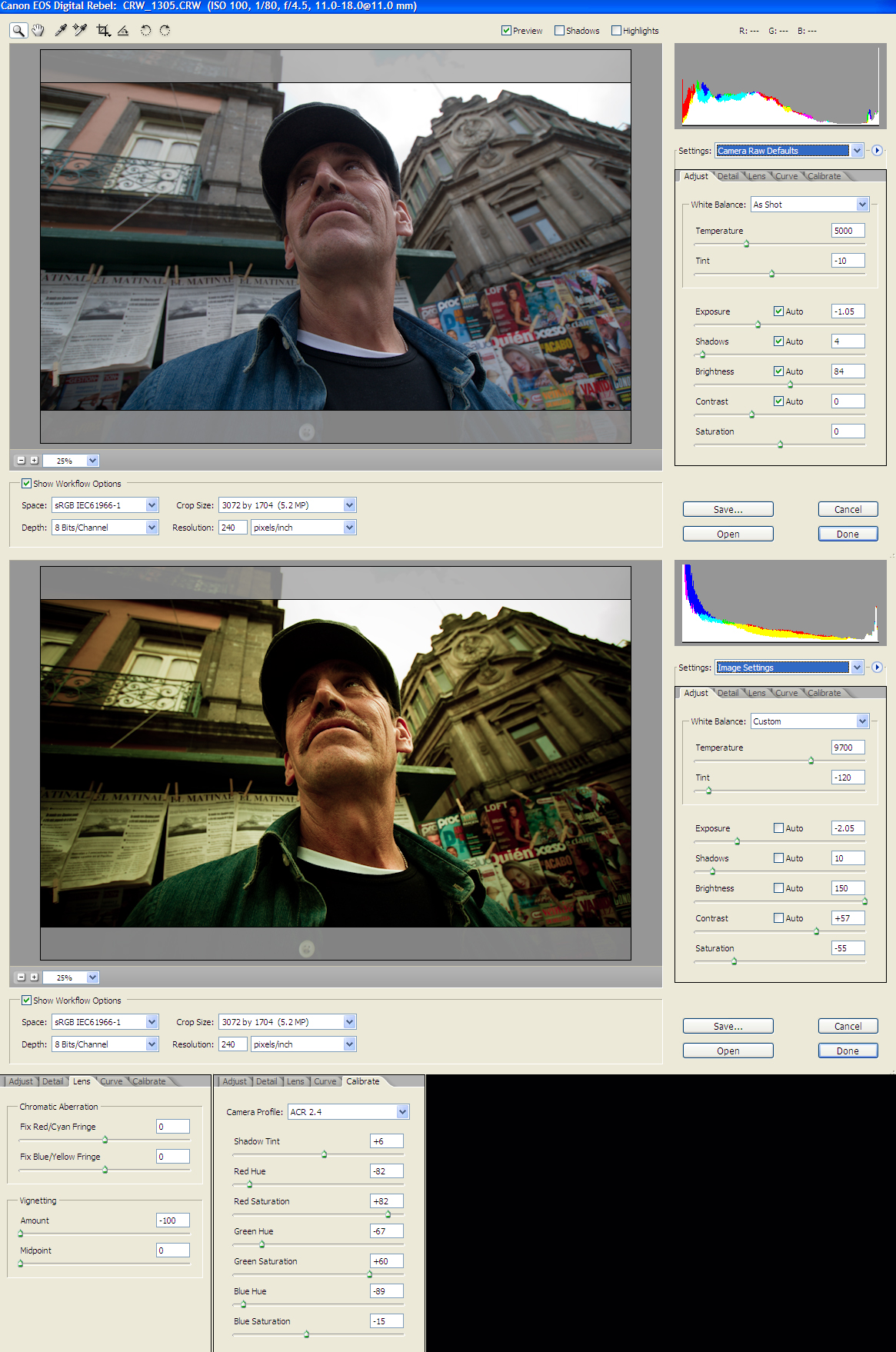
Here you can see the original photo and the color correction one, with all the RAW parameters. Hope you find this helpful.
Best View Original Size.
Here its the photo in full size
Photos from other people using this tutorial:
Clowning around by Nikonographer
mandolin LM green by adderall_223
If you use this tutorial on your photos it would be nice to add them here :), so let me know!
Our newest tutorial on Brickbuilt is another installment in our growing number of furniture tutorials.
Se necesita 70 cm de alambre de 2mm de diametro.
Le debo este descubrimiento a Paula -Cruz, muchísimas gracias Paula , tu si que eres Super¡¡¡¡¡¡¡
Este tutorial también se lo dedico a calabacina www.flickr.com/photos/29534130@N04
Maria José, se merece esto y más, un beso.
More furniture designs are explained in our latest guide on Brickbuilt!
Tutorials | Creations | Featured Tutorials | Build Logs | Commissions
Need a new well design to spice up your medieval layouts? Check out this tutorial on Brickbuilt.
Tutorials | Creations | Featured Tutorials | Build Logs | Commissions
One of the fun things I'm doing over on Brick Fiend is Tutorial Tuesday. I'll be doing small little builds in four or five steps, that pretty much anybody can build!
Flickr will be getting them a week or so after the Facebook page will be, so go Like the page to get them when they come out!
New guide up on Brickbuilt!
Tutorials | Creations | Featured Tutorials | Build Logs | Commissions
If you need instructions for each step, look for this tutorial in my youtube channel: www.youtube.com/watch?v=t_5qrri6U58
Pronto! Panô terminado, prontinho pra cobrir a minha caixa de disjuntores... assim que eu tiver coragem de colocar preguinhos na parede! =P
Tenho dois tutoriais de viés pra indicar, usei ambos no acabamento deste panô:
1) Básico, como aplicar e como fazer os cantinhos: www.pat.patches.nom.br/retalhos/dicas/acabamento.htm
2) Como finalizar o viés, para que não fique evidente onde começa e onde termina: eltallerdegeorgina.blogspot.com/2009/07/tutorial-bies-fin...
Este último é genial, recomendo.. a impressão é que não vai dar certo, mas funciona direitinho!
Beijos, Gi.
My HDR tutorial is now ready please have a look Tutorial
This is the basic form of the three largest trees in the Pool Party. Here's how I made it. See the comment below for instructions and links to larger images.
There are other methods of making trees with this technique. I'll talk about some of those later.
I had a request to show better how to make these trees. I do hope that this is easy to follow.
Edit: Here is a link to a photo with small leaves woven: www.flickr.com/photos/eilonwy77/7238222882/in/photostream
See complete set for other examples: www.flickr.com/photos/eilonwy77/sets/72157629804759804/
Soccer Grass Tutorial
Another grass tutorial from my Element Experimentation series. This grass is shorter and tidier than the wavy grass that I showed in my previous tutorial and looks more like what you'd typically find on a soccer field. You can find the tutorial here:
fullplatebuilds.com/2018/11/06/soccer-grass-tutorial/
Hope you find it useful :)
Hello Folks,
Repeatedly, I see our friends having problems understanding and making the best use of Raw Conversion. There is actually a lot that can be done, while converting a raw file. If you can make the best of the tools available, you actually don't need to do much in post processing at all.
Here you may read the rest of the story if interested.
This was done in Photoshop CS2. I may at some point do a similar interface tutorial for CS3 if the interest level happened to be high enough.
We have started a brand new feature on Brickbuilt: guest tutorials! Every month a guest will be contributing a new tutorial, and to kick things off, Joeri Ridder shared his beautiful tree design: tutorial link.
Created following this tutorial www.youtube.com/watch?v=VXtR8WSciBo
I tried to follow along at actual speed, but I had to pause a few times to catch up.
I also used Sepia instead of Burnt Sienna, because that's the closest colour in my watercolour tin.
pues estos pendientes son los que he hecho para un vídeo demostrativo,
tutorial youtu.be/6AgWFBnr2tw
tambien podeis verlo en el apartado de esquemas de mi blog www.cristinarugar.blogspot.com
A short tutorial on a type of leafy bush that I use quite often when building landscapes. It's quite simple and cheap, but looks quite nice and have an organic curve to it :) It can also be built to different heights for variation, and the top can be either rounded or pointed, depending on what look you're going for.
You can find the tutorial here:
fullplatebuilds.com/2018/12/07/leafy-bush-tutorial/
Hope you find it useful :)
Made an article/tutorial on how to use office and art supplied for product photography. Also how t create this kinds of shot. Head on over to petapixel.com/2016/05/09/use-office-art-supplies-product-...
for the whole article.
Strobist info:
Studiostrobe thru softbox and scrim subject right @ 1/16
Studiostrobe thru softbox and scrim back left of subject @ 1/16
White Fill card front left and right side of subject
Taking a look at a sci-fi design this week!
I used this technique in my last SHIP, and hope you all find it interesting.
Read the guide now on Brickbuilt.
Tutorials | Creations | Featured Tutorials | Build Logs | Commissions
blog.knottygnome.com/2013/04/rolling-diamonds-tutorial.html
if you downloaded prior to 4PM EST 04/30/13, i added another tip at the end on cutting the rectangles as a strip set. Sorry for any inconvenience!
here is what my book looks like after all the pages are decorated
tutorial here:
theadventuresofbluegirlxo.blogspot.com/2010/01/birthday-w...
Someone asked for a tutorial on how to make an AK hanging from a strap seen here. Well, here it is :) Give credits if you use this.
Step 1.
Wrap a rubberband around waist. It doesn't have to go around leg, but I like the look of it.
Step 2.
Put your weapon of choice under the rubberband.
Step 3.
Add second rubberband around the barrel. I used different colors so it is easier to see what's going on there.
Step 4.
Do what I did in the pic.
Step 5.
Raise hand between handle and stock, so the gun is in nice position and it looks like he is holding the gun.
Step 6.
Add all the sweet accesories and equipment. Done!
Short and sweet guide for this carpet design has just been posted on Brickbuilt.
Tutorials | Creations | Featured Tutorials | Build Logs | Commissions
My attempt at a tutorial. I love when other people do tutes and put all the steps into one photo.
Since I don't have a lot of computer savvy, or fancy programs, this is the best I could do for now:
1. Choose a template shape that you like, or make your own from paper. The bottom layer is a solid flat - about #2 on an Atlas - cut to shape.
2. The middle layer is the same thickness, same shape, but with a mirror hole cut out. Leave a tiny bit of squiggle room to let the clay shrink around the mirror a little during cure.
3. The top layer is the decorated layer. Same thickness. Sky's the limit. Anything goes. Cut to the same shape. Cut the hole a little smaller so the mirror doesn't fall out when you're done.
4. Pile all three layers on top of each other, matching up the design with each layer. Sometimes I smear a drop or two of liquid polymer to act as a binding agent between layers. Add an edging to cover the laminations. Cure all at once!
Aquí os dejo este tutorial de como he hecho las flores del Conjunto Alia.
Se necesita bote de plástico , tijeras y soldador. Es mucho más cómodo de trabajar y más seguro.
Se cortan los círculos con forma de pétalos.
Hacer el agujero del centro.
Acercar los lados de los pétalos al soldador y poco a poco se van encogiendo.
Cuando están los lados acercar el pétalo por la parte de arriba al soldador, empezará a encogerse, después pasarlo a la punta del soldador y se encogerá del centro. Haciendo la forma del pétalo natural,
Así con los 4 pétalos.
Volver a hacer lo mismo con un círculo más pequeño.
Unirlos con fornituras al gusto del artista.
Qué tengáis una primavera muy floreada¡¡¡¡¡¡
This is just a funny picture that I will discuss in BLOG in a few days. I'm planning a little tutorial about how to create very cool lighting effects in different ways with Photoshop CS6. Have fun :-)
Wrote a short tutorial on how palm trees can be built.
This is by no means my design, or anything new for that matter. But I had to make a tutorial for it for a tree building workshop I held recently, so I figured I might as well post it :)
The design is rather commonplace I think and I have no idea who first came up with it, but when I was going to build one I wasn't sure how people had put the top together. I went with green flotation devices as the attachment piece for the leaves, which I suspect is not how it's usually done, but it works :)
You can find the tutorial here:
fullplatebuilds.com/2018/11/21/palm-tree-tutorial/
Hope you find it useful :)
~ EXPLORED # 116 ~ Best view large.
1. Roll out some sugarpaste and cut them using three sizes of daisy cutters.
2. Cut out two sizes of large, two medium and three small daisies.
3 With a ball tool,gently draw each petals from the centre out to the tip to lengthen and widen.
4 Gently curl out from the tip in towards the centre to cup the end.
5 Petals are ready to be arranged.
6. Arrange the petals according to the sizes from large to small in a pallete.
7. Cup the ends more, to create a tighter array that hides the centre of the flowers.
I hope the tutorial and the instruction would benefit you . all the best everyone..:)
Hi guys!
This is a sneak peek of a tutorial that will be soon published in a book. There will be more details coming soon! I really enjoyed working and exploring new techniques in this one!
Hope you guys like it and feel free to leave me a comment! Thanks!
UPDATE: This tutorial is part of the new Abduzeedo Book that was released a couple weeks ago, here's the link about the book. book.abduzeedo.com/
Explored! =D
I've been asked a couple of times how I process my eyes so I decided to make a tutorial for you guys! Hope it helps and I'd love to see your results!! =D
*I have credit Paige Nicole too! She made me see the use of the Dodge Tool!!
You MUST visit her stream, her eye photos are AMAZING!!*
I'm sorry for being totally MIA the last couple of days! I've been totally un-inspired and busy doing my First Real Photoshoot!!! Hopefully I'll get more inspiration soon!
156/365
Wansink Photography © All Rights Reserved. 2009. Do not use, copy or edit any of my photographs without written permission.
annemckinnell.com/2019/06/25/enhance-your-photos-with-tex...
Do you ever have a photo that you really like, but you want it to be a little … more? Or maybe you just want another version of the image that is a little different? Perhaps more dramatic and artistic looking?
Adding textures is a fantastic way to get that extra depth and create a really unique look in your images.
In my new video tutorial I’ll show you how easy it is to add textures to your photos using my new Bisbee Texture Collection.
As promised: A little Tutorial how to build the centaur. I hope it is clear how it can be rebuild.
A step by step Tutorial would take too much time, I don't have. But I think this should be helpful. And if you got any Questions, just hit me up.
I'm also on Instagram. There's the chatting easier!