Free Blogger Templates
View allAll Photos Tagged template
Social Media Wall Post/Story design of Ram Dunya
Are you looking for creative business cards templates?
Then you came to the right place, follow this link to explore more: www.codester.com/Pixime
Are you looking for creative business cards templates?
Then you came to the right place, follow this link to explore more: www.codester.com/Pixime
Are you looking for creative business cards templates?
Then you came to the right place, follow this link to explore more: www.codester.com/Pixime
Are you looking for creative business cards templates?
Then you came to the right place, follow this link to explore more: www.codester.com/Pixime
Colour study in macro.
Image kingsleydavis.co.uk/#
Please do not use or reproduce this image on Websites/Blog or any other media without my explicit permission.
Instagram: @flipthescriptbook
© All Rights Reserved Kingsley Davis
My newest template! Background colors can be easily changed to match your images and style. I just love green, hehe.

I re-did my complete minifig template. I combined the hip pieces with the torso pieces to make it easier to cut out and apply.
The only draw back is that the hip section has to be with the torso when the decals are appled.
Here are the files:
AI www.mediafire.com/?e6mm36dgkk3o2tl
PSD www.mediafire.com/i/?za0ejbhf4g6aei7
SVG www.mediafire.com/?m0wx8zeglzea21d
PDN www.mediafire.com/?6a3u6ho6960tkt2
PNG www.mediafire.com/i/?yp4k1p60w90deag
JPG www.mediafire.com/i/?a4cos447cva364n
** Please give me credit for my work **
I mentioned the other day that I will be creating and uploading a set or two of templates for you to use as you wish (except sell ;) as a way to give back.
here are screen shots of the first set. I will be uploading them and post the links in here before this evening.
still working on the second set, which has a more modern feel. I thought I would have something for everyone. that set will not be up until next weekend probably.
come back and download if you enjoy them. You don't have to, but I would appreciate getting some feedback on them (beside 'oh, I love these' or 'oh, I hate these') once you try them. (check out my profile for the download links)
these are BC size. as the examples show you can use them as play date cards, save the date (gift to the couple after an engagement session), cards for mommies of newborns (most hospitals offer mommy and me classes that new moms attend), or as senior rep cards. All awesome ways to market your business.
also, they follow the WHCC specs. I will be checking on the miller print specs and make notes of that if anything is different.
*****
a few facts:
- the templates are created with the CS3 suite, all the final files are.psd files. I have not tried to work with them in other versions of Photoshop, so I don't know if problems are going to come up when they are opened in other versions. (it would be cool if you can let me know what your experience was)
- you can not sell them in any way, shape or form as templates, but you can use them to create printed products for your clients
- here is a link to the free font I used for the front/name (OptimusPrinceps); the second font, the serif is Baskerville. if you do not own that I strongly recommend using another similar, serif font.
- the image is cropped to the shape you see in the examples I posted, with clipping masks. you will find that very simple to use once you understand the concept. I don't have any directions included, but here is a link to a video tutorial on the whcc website on how to work with clipping masks (the first video on the page. here is the link: focused.whcc.com/how-it-works)
For these templates the clipping mask is already included.
all you need to do is:
1. drag your photo in the template (sized down so it fits within the card),
2. make sure that on the layer called LAYER MASK the mask is the one selected (just click on the box on the right to do that)
3. and then while holding down the option key drag the mask on the layer where your photo is and watch the magic happen :).
Enjoy!
(and pay it forward someday :)
p.s. if you are still having troubles I can put together a quick tutorial (with images) within the next week.
the second set of templates will be up by next weekend
How to Find the Right Mailing List List brokers have a wealth of knowledge about mailing lists that can make the task of selecting the right list much easier. They can also help you negotiate lower list-rental rates, which is a real benefit since renting lists can be expensive. List ... Read
videogalleria.net/how-to-find-the-right-mailing-list/
Visit videogalleria.net to template videos for your business
Quick idea for the Order Of Magnitude homepage sketched out on my custom wireframe template.
You can download the pdf template and read more about it on my blog
This is my template free for everyone,
here it is in vector format:
www.mediafire.com/?dheeg3hppe5l538
4.6059 cm W x 2.5569 cm H
If you watched my decal tutorial video, I mentioned I'd upload a minifig template to help people get started. These templates are adapted versions of ones that Roaglaan once posted.
The leg decals completely cover the leg as one smooth decal as opposed to four separate decals. The torso and belt are made together, but can easily be separated by knife or digitally. The arms can cover a minifigure's forearm and the front surface of their should/upper arm; you'll notice a small slit near the elbow, that needs to be cut to get the arm to conform around a minifigre's elbow properly (all my clones have this).
I hope this helps people to make more accurate decals and for those who buy my decals to know how to properly cut them out. If you use this, please give credit where it's due, and happy decaling ~
The next tutorial will be up next week.
-Andrew
I finished my clone helmet template. This isn't one of my best applications, I rushed it to see how the pieces fit and I have to say I am pleased with it.
I suggest taking your time when applying these, especially the smaller ones, it is very easy to make mistakes and ruin a decal. I would also suggest some type of mounting fluid, it helps the decal slide and move easier without stretching or tearing.
Ok, now for the good part, the templates:
Illustrator file, www.mediafire.com/?7k90uic3b5jrvyh
paint.net, www.mediafire.com/?zisfa7bnyfb8142
png, www.mediafire.com/i/?dgabbp7r1u3ifac
photoshop, www.mediafire.com/?g5ojeaf52q33285
svg, www.mediafire.com/?56jwub8xg1vu61u
I worked hard on this and all of my designs so I would appreciate it if I am given credit for my work.
Here's a handy graphic I made to help prospective builders, on their quest to build an IATTAR racer!
Please note, your racer can be any shape or size; this graphic just serves to highlight the specifics.
Prenup Template
Copyright Notice:
This photo has a copyright, any redistribution nor transmit or store it in any other website or other form of electronic retrieval is prohibited without express written permission from the owner. campsg photography
i was trying so hard to be myself i was turning into
[add your photo id / passport photo / driving license / work id card etc and i will add it to this set
thank you for participating]
Neon Party Flyer Template
Neon Party Flyer Template PSD was designed to advertise a glow party or a neon party inside a club / pub / bar.
The design is well sorted in folders, and all the elements can be removed or rearranged as you please. You don’t need a good knowledge of Photoshop to...
I am re-posting this module which was created [discovered] in 1990. The main reason for re-posting this is that I found a more logical way to get that odd angle. The method is quite accurate but I do not think that it is Mathematically correct. The method is best illustrated by the photo diagram. Briefly, it shows the angles [in black] required for 4, 6, 8 modules assembly like stars, and coasters. Those angles radiate from the bottom left corner to the middle crease line. These angles can be easily generated by simple folds. Therefore, in order to get the angle required for a 5 piece assembly, logically, that angle should be in between 4 and 6. Can I logically assume that the bisector [circled and in red] the correct angle? Likewise, for a 7-piece assembly I take the bisector of 6 and 8 to be the correct angle. The interesting part here is that, that angle radiates from the corners to almost the middle of the opposite edge. I have assembled some 7 piece coasters quite accurately with this and will post them in due course. More details of this module was posted in 1993 - www.flickr.com/photos/61236172@N08/11003407114/in/datepos...
Template (half) for plush owl craft. See all the details on our blog at blog.thecelebrationshoppe.com/2009/08/24/diy-plush-owl/
I'm making my template files available to anyone who wants to use them.
complete minifig template .ai format
www.mediafire.com/?2ow7gldpn7b5gax
complete minifig template .svg format
www.mediafire.com/?av062r6iqlcxu8l
complete minifig template .psd format
www.mediafire.com/?rr2fh2mz4ql4n4k
complete minifig template .jpg format
www.mediafire.com/imgbnc.php/9bc839dc4f55b75d8f58d4b04753...
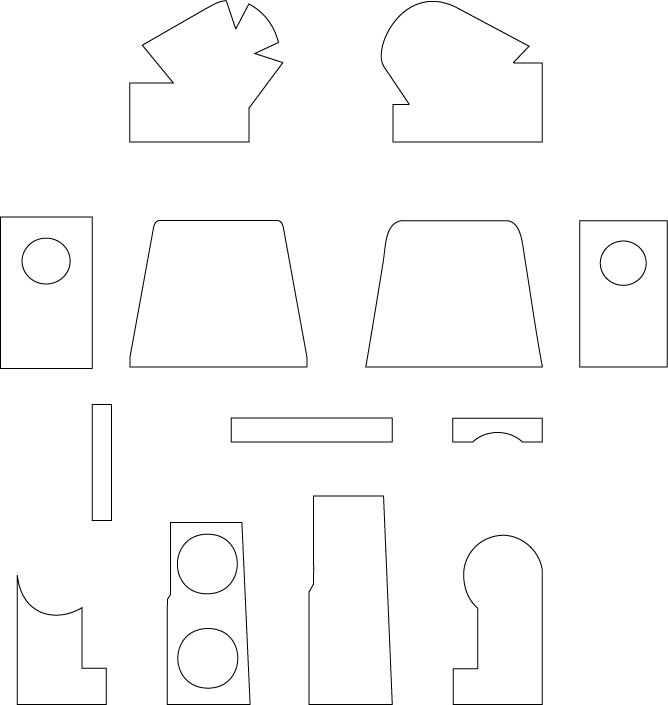
minifig mannequin template .ai format
www.mediafire.com/?pwiwtivi491px07
minifig mannequin template .svg format
www.mediafire.com/?ofn756np46u4fa3
minifig mannequin template .psd format
www.mediafire.com/?gx2xg196lko8j6v
vest template .ai format
www.mediafire.com/?d6eucfd3y2xux0r
vest template .svg format
www.mediafire.com/?ecbovyz03v8sj7c
vest template .psd format
www.mediafire.com/?v9r9tyn8nnt16qs
All you need to do is click the link and it will ask you to open or save the file,
This is the template for a multicultural Santa paper ornament. Very easy to assemble. A great family project.
Download a high resolution version at
www.carlosNmolina.com Select "tutorials", choose the Santa button.
Enjoy!
Happy Holiday to All!!!
Carlos N.