View allAll Photos Tagged drupal

The fruit bearing clusters of palm trees are called drupes. This is a close-up of one cluster of drupes from a Pygmy Date Palm from my yard. (I also have another variety of palm that produces huge drupes of orange, fiberous fruit, each drupe cluster weighing about 20 pounds or 9 kilos.)


The drupes emerge from a protective pod (also pictured) that hardens into wood after opening. The little balls on the stalks are flower buds which will turn into tiny yellow flower clusters before going to seed.


Shot for Looking Close… on Friday!, Flora on Black Background


Au 14 °S , le café est surtout une plante cultivée en Ethiopie , puis au Yemen .

Des Hollandais importeront des graines , en Inde , à Ceylan et dans l'ile de Java.

Ce sont des plants d' Arabica...... qui vont se développer, également dans les iles avoisinantes.

Au 19° s , une épidémie de rouille dévaste la majeure partie des plantations.

L'indonésie introduit alors le café Robusta ,plus résistant à cette maladie.

Depuis l'indépendance, les plantations de café sont gérées comme des plantions publiques d'Etat , et on introduit de nouvelles variétés d'Arabica....

Désormais, 90% des plantations fournissent du Robusta et les autres plantations de l'Arabica .

L’arabica est cultivé dans les fincas (fermes) entre 750 et 1400 m d'altitude sur les flancs du volcans de Bandung et dans l'Est de java sur le Plateau d' Ijen.


I had to look up online to see what this fruit is called. From Wikipedia: "The fruits of all dogwood species are drupes with one or two seeds, often brightly colorful."

Even though the outer hull is gone from one of these walnuts, the meat of the nut is not exposed. You have to remove the inner covering in order to get that. Seen under a tree in a restaurant parking lot.


Thanks for looking! Isn't God a great artist and builder?

Houx / Common holy / Ilex aquifolium

December 2008 - IBBT Ghent, Belgium

Picture courtesy of Thomas (www.n00.be)

This is our ad for DrupalCon SF, where we have a spot in the program booklet as sponsors.


So what's Kit? Check it out: drupal.org/project/kit.

Poison Ivy is well-known for causing Urushiol-induced contact dermatitis, an itchy, irritating, and sometimes painful rash in most people who touch it. It is caused by urushiol, a clear liquid compound in the plant's sap.


The berry-like fruit, a drupe, mature by August to November with a grayish-white colour. Fruits are a favorite winter food of some birds and other animals. Seeds are spread mainly by animals and remain viable after passing through the digestive tract.


Source: en.wikipedia.org/wiki/Toxicodendron_radicans


[The word 'sumac' traces its etymology from Old French sumac (13th century), from Mediaeval Latin sumach, from Arabic summāq (سماق), from Syriac summāq (ܣܡܘܩ)- meaning "red"]


Sumacs are shrubs and small trees that can reach a height of 1–10 m (3.3–32.8 ft). The leaves are spirally arranged; they are usually pinnately compound, though some species have trifoliate or simple leaves. The flowers are in dense panicles or spikes 5–30 cm (2.0–11.8 in) long, each flower very small, greenish, creamy white or red, with five petals. The fruits form dense clusters of reddish drupes called sumac bobs. The dried drupes of some species are ground to produce a tangy crimson spice.[5][6]


Sumacs propagate both by seed (spread by birds and other animals through their droppings), and by new shoots from rhizomes, forming large clonal colonies.


mulberry drupe snail

Berry like drupes on Sumac bushes are edible with a citrus taste. I didn't know that when I took the photo - maybe next year. Holga 120N, Lomo 100 color film.

Henry County, Georgia

Gray dogwood (Cornus racemosa) leaves turn shades of maroon and purple. White berries or “drupes” grow on stalks that turn bright red in autumn.

Wizzlern.nl is a group of skilled Dutch Drupal experts who can train developers and themers in Drupal.

I was very lucky that I was taken to this wild olive forest on the outskirts of Zhob. Wild olive forests are found in the upland areas of the west and north of Pakistan. This forest was very serene and with no visitors. It was amazing just being there. The atmosphere was very tranquil. It was quite chilly and most of the bird life are summer visitors. We did manage to see Woodpigeons, Magpies and some Finches though. There are Shrikes, Warblers, Buzzards, Mistle Thrushes, Spotted Flycatchers and Partridges in the olive forest.


en.wikipedia.org/wiki/Olive


The Olive ( /ˈɑːləv/ or /ˈɒlɨv/), Olea europaea, is a species of a small tree in the family Oleaceae, native to the coastal areas of the eastern Mediterranean Basin (the adjoining coastal areas of southeastern Europe, western Asia and northern Africa) as well as northern Iran at the south end of the Caspian Sea. Its fruit, also called the olive, is of major agricultural importance in the Mediterranean region as the source of olive oil. The tree and its fruit give its name to the plant family, which also includes species such as lilacs, jasmine, Forsythia and the true ash trees (Fraxinus). The word derives from Latin "oliva" which in turn comes from the Greek ἐλαία (elaia)[1][2] ultimately from Mycenaean Greek e-ra-wa ("elaiva"), attested in Linear B syllabic script.[3][4] The word 'oil' in multiple languages ultimately derives from the name of this tree and its fruit.


Description

The olive tree is an evergreen tree or shrub native to the Mediterranean, Asia and Africa. It is short and squat, and rarely exceeds 8–15 metres (26–49 ft) in height. The silvery green leaves are oblong in shape, measuring 4–10 centimetres (1.6–3.9 in) long and 1–3 centimetres (0.39–1.2 in) wide. The trunk is typically gnarled and twisted.

The small white, feathery flowers, with ten-cleft calyx and corolla, two stamens and bifid stigma, are borne generally on the last year's wood, in racemes springing from the axils of the leaves.

The fruit is a small drupe 1–2.5 centimetres (0.39–0.98 in) long, thinner-fleshed and smaller in wild plants than in orchard cultivars. Olives are harvested in the green to purple stage. Canned black olives may contain chemicals (usually ferrous sulfate) that turn them black artificially.


Paleobotany

The place, time and immediate ancestry of the cultivated olive are unknown. It is assumed that Olea europaea may have arisen from O. chrysophylla in northern tropical Africa and that it was introduced into the countries of the Mediterranean Basin via Egypt and then Crete or Israel, Syria and Asia Minor. Fossil Olea pollen has been found in Macedonia, Greece, and other places around Mediterranean, indicating that this genus is an original element of the Mediterranean flora. Fossilized leaves of Olea were found in the palaeosols of the volcanic Greek island of Santorini (Thera) and were dated about 37.000 B.P. Inprints of larvae of olive whitefly Aleurolobus (Aleurodes) olivinus were found on the leaves. The same insect is commonly found today on olive leaves, showing that the plant-animal co-evolutionary relations have not changed since that time.


History

The olive is one of the plants most often cited in literature. In Homer's Odyssey, Odysseus crawls beneath two shoots of olive that grow from a single stock,[6] and in the Iliad, (XVII.53ff) is a metaphoric description of a lone olive tree in the mountains, by a spring; the Greeks observed that the olive rarely thrives at a distance from the sea, which in Greece invariably means up mountain slopes. Greek myth attributed to the primordial culture-hero Aristaeus the understanding of olive husbandry, along with cheese-making and bee-keeping.[7] Olive was one of the woods used to fashion the most primitive Greek cult figures, called xoana, referring to their wooden material; they were reverently preserved for centuries.[8] It was purely a matter of local pride that the Athenians claimed that the olive grew first in Athens.[9] In an archaic Athenian foundation myth, Athena won the patronship of Attica from Poseidon with the gift of the olive. Though, according to the 4th-century BC father of botany, Theophrastus, olive trees ordinarily attained an age of about 200 years,[10] he mentions that the very olive tree of Athena still grew on the Acropolis; it was still to be seen there in the 2nd century AD;[11] and when Pausanias was shown it, ca 170 AD, he reported "Legend also says that when the Persians fired Athens the olive was burnt down, but on the very day it was burnt it grew again to the height of two cubits."[12] Indeed, olive suckers sprout readily from the stump, and the great age of some existing olive trees shows that it was perfectly possible that the olive tree of the Acropolis dated to the Bronze Age. The olive was sacred to Athena and appeared on the Athenian coinage.

The Roman poet Horace mentions it in reference to his own diet, which he describes as very simple: "As for me, olives, endives, and smooth mallows provide sustenance."[13] Lord Monboddo comments on the olive in 1779 as one of the foods preferred by the ancients and as one of the most perfect foods.[14]

The leafy branches of the olive tree - the olive leaf as a symbol of abundance, glory and peace - were used to crown the victors of friendly games and bloody wars. As emblems of benediction and purification, they were also ritually offered to deities and powerful figures; some were even found in Tutankhamen's tomb.

Olive oil has long been considered sacred; it was used to anoint kings and athletes in ancient Greece. It was burnt in the sacred lamps of temples as well as being the "eternal flame" of the original Olympic Games. Victors in these games were crowned with its leaves. Today, it is still used in many religious ceremonies.

Over the years, the olive has been the symbol of peace, wisdom, glory, fertility, power and pureness. The olive tree and olives are mentioned over 30 times in the Bible, in both the New and Old Testaments. It is one of the first plants mentioned in the Bible, and one of the most significant. For example, it was an olive leaf that a dove brought back to Noah to demonstrate that the flood was over. The Mount of Olives east of Jerusalem is mentioned several times. The Allegory of the Olive Tree in chapter 5 of the Book of Jacob in the Book of Mormon, refers to the scattering and gathering of Israel. It compares the Israelites and gentiles to tame and wild olive trees. The olive tree itself, as well as olive oil and olives, play an important role in the Bible.[15]

The olive tree and olive oil are mentioned seven times in the Quran, and the olive is praised as a precious fruit. In Chapter 24 Al-Nur: "Allah is the Light of the heavens and the earth. The metaphor of His Light is that of a niche in which is a lamp, the lamp inside a glass, the glass like a brilliant star, lit from a blessed tree, an olive, neither of the east nor of the west, its oil all but giving off light even if no fire touches it. Light upon Light. Allah guides to His Light whoever He wills and Allah makes metaphors for mankind and Allah has knowledge of all things." (Quran, 24:35). Olive tree and olive oil health benefits have been propounded in Prophetic medicine. The Prophet Mohamed is reported to have said: "Take oil of olive and massage with it - it is a blessed tree" (Sunan al-Darimi, 69:103).

The olive tree is native to the Mediterranean region and Western Asia, and spread to nearby countries from there. It is estimated the cultivation of olive trees began more than 7000 years ago. As far back as 3000 BC, olives were grown commercially in Crete; they may have been the source of the wealth of the Minoan civilization.[16] The ancient Greeks used to smear olive oil on their bodies and hair as a matter of grooming and good health.

Theophrastus, in On the Nature of Plants, does not give as systematic and detailed an account of olive husbandry as he does of the vine, but he makes clear (in 1.16.10) that the cultivated olive must be vegetatively propagated; indeed, the pits give rise to thorny, wild-type olives, spread far and wide by birds. Theophrastus reports how the bearing olive can be grafted on the wild olive, for which the Greeks had a separate name, kotinos.[17]

After the 16th century, the Europeans brought the olive to the New World, and its cultivation began in Mexico, Peru, Chile and Argentina, and then in the 18th century in California. It is estimated that there are about 800 million olive trees in the world today, and the vast majority of these are found in Mediterranean countries.


Old olive trees


The olive tree is a very hardy species: drought-, disease- and fire-resistant, and can live for a very long time. Its root system is very robust and capable of regenerating the tree even if the above-ground structure is destroyed. The older an olive tree is, the broader and more gnarled its trunk appears. Many olive trees in the groves around the Mediterranean are said to be hundreds years old, while an age of 2,000 years is claimed for a number of individual trees and in some cases this has been verified scientifically.

Pliny the Elder told of a sacred Greek olive tree that was 1,600 years old. An olive tree in west Athens, named "Plato's Olive Tree", was rumored to be a remnant of the grove within which Plato's Academy was situated, which would date it to approximately 2,400 years ago. The tree was a cavernous trunk from which a few branches were still sprouting in 1975, when a traffic accident caused a bus to fall on and uproot it. Since then the trunk is preserved and displayed in the nearby Agricultural University of Athens. A supposedly even older tree, called the "Peisistratos Tree", is located by the banks of the Cephisus River, in the municipality of Agioi Anargyroi, and is said to be a remnant of an olive grove planted by Athenian tyrant Peisistratos in the 6th century BC. A number of Ancient Olive trees also exists in the area of mountain Pelion in Greece.


An olive tree in Algarve, Portugal, is 2000 years old, according to radiocarbon dating.[18] The age of an olive tree in Crete, claimed to be over 2,000 years old, has been confirmed on the basis of tree ring analysis.[19]

An olive tree in Bar, Montenegro, is claimed to be over 2,000 years old.[20]

Another well-known olive tree on the island of Brijuni (Brioni), Istria in Croatia, has been calculated to be about 1,600 years old. It still gives fruit (about 30 kg/66 lb per year), which is made into top quality olive oil.[21]

According to a recent scientific survey, there are dozens of ancient olive trees throughout Israel and Biblical Palestine, 1,600-2,000 years old.[22] Ancient trees include two giant olive trees in the Arab town of Arraba and five trees in Deir Hanna, both in the Galilee region, which have been determined to be over 3,000 years old,[22] although the credibility of the study that produced these dates has been questioned. All seven trees continue to produce olives.

Several trees in the Garden of Gethsemane (from the Hebrew words "gat shemanim" or olive press) in Jerusalem are claimed to date back to the time of Jesus.[23]

Some Italian olive trees are believed to date back to Roman times, although identifying progenitor trees in ancient sources is difficult. A tree located in Santu Baltolu di Carana (municipality of Luras) in Sardinia, Italy, named with respect as the Ozzastru by the inhabitants of the region, is claimed to be 3,000 to 4,000 years old according to different studies. There are several other trees of about 1,000 years old within the same garden.


Cultivation and uses

The olive tree has been cultivated for olive oil, fine wood, olive leaf, and the olive fruit. The earliest evidence for the domestication of olives comes from the Chalcolithic Period archaeological site of Teleilat Ghassul in what is today modern Jordan.

Farmers in ancient times believed olive trees would not grow well if planted more than a short distance from the sea; Theophrastus gives 300 stadia (55.6 km/34.5 mi) as the limit. Modern experience does not always confirm this, and, though showing a preference for the coast, it has long been grown further inland in some areas with suitable climates, particularly in the southwestern Mediterranean (Iberia, northwest Africa) where winters are mild.

Olives are now cultivated in many regions of the world with Mediterranean climates, such as South Africa, Chile, Peru, Australia, the Mediterranean Basin, Israel, Palestinian Territories and California and in areas with temperate climates such as New Zealand, under irrigation in the Cuyo region in Argentina which has a desert climate. They are also grown in the Córdoba Province, Argentina, which has a temperate climate with rainy summers and dry winters (Cwa).[24] The climate in Argentina changes the external characteristics of the plant but the fruit keeps its original features.[25]

Considerable research supports the health-giving benefits of consuming olives, olive leaf and olive oil (see external links below for research results). Olive leaves are used in medicinal teas.

Olives are now being looked at[26] for use as a renewable energy source, using waste produced from the olive plants as an energy source that produces 2.5 times the energy generated by burning the same amount of wood. The same reference claims that the smoke released has no negative impact on neighbors or the environment, and the ash left in the stove can be used for fertilizing gardens and plants. The process has been patented in the Middle East and the US (for example).


Subspecies

There are six natural subspecies distributed over a wide range:[28]

•Olea europaea subsp. europaea (Mediterranean Basin)

•Olea europaea subsp. cuspidata (from South Africa throughout East Africa, Arabia to South West China)

•Olea europaea subsp. guanchica (Canaries)

•Olea europaea subsp. cerasiformis (Madeira)

•Olea europaea subsp. maroccana Morocco

•Olea europaea subsp. laperrinei (Algeria, Sudan, Niger)

The subspecies maroccana and cerasiformis are respectively hexaploid and tetraploid.


Growth and propagation

Olive trees show a marked preference for calcareous soils, flourishing best on limestone slopes and crags, and coastal climate conditions. They grow in any light soil, even on clay if well drained, but in rich soils they are predisposed to disease and produce poorer oil than in poorer soil. (This was noted by Pliny the Elder.) Olives like hot weather, and temperatures below −10 °C (14.0 °F) may injure even a mature tree. They tolerate drought well, thanks to their sturdy and extensive root system. Olive trees can live exceptionally long, up to several centuries, and can remain productive for as long, if they are pruned correctly and regularly.

Olives grow very slowly, and over many years the trunk can attain a considerable diameter. A. P. de Candolle recorded one exceeding 10 metres (33 ft) in girth. The trees rarely exceed 15 metres (49 ft) in height, and are generally confined to much more limited dimensions by frequent pruning. The yellow or light greenish-brown wood is often finely veined with a darker tint; being very hard and close-grained, it is valued by woodworkers. There are only a handlful of olive varieties that can be used to cross-pollinate. Pendolino olive trees are partially self-fertile, but pollenizers are needed for a large fruit crop. Other compatible olive tree pollenizers include Leccino and Maurino. Pendolino olive trees are used extensively as pollenizers in large olive tree groves.

Olives are propagated by various methods. The preferred ways are either cuttings or layers; the tree roots easily in favourable soil and throws up suckers from the stump when cut down. However, yields from trees grown from suckers or seeds are poor; they must be budded or grafted onto other specimens to do well (Lewington and Parker, 114). Branches of various thickness cut into lengths of about 1 metre (3.3 ft) and planted deeply in manured ground, soon vegetate. Shorter pieces are sometimes laid horizontally in shallow trenches and, when covered with a few centimetres of soil, rapidly throw up sucker-like shoots. In Greece, grafting the cultivated tree on the wild tree is a common practice. In Italy, embryonic buds, which form small swellings on the stems, are carefully excised and planted under the soil surface, where they soon form a vigorous shoot.

Occasionally, large branches are marched[clarification needed] to obtain young trees. The olive is also sometimes grown from seed; to facilitate germination, the oily pericarp is first softened by slight rotting, or soaked in hot water or in an alkaline solution.

Where the olive is carefully cultivated, as in Languedoc and Provence, the trees are regularly pruned. The pruning preserves the flower-bearing shoots of the preceding year, while keeping the tree low enough to allow the easy gathering of the fruit. The spaces between the trees are regularly fertilized. The crop from old trees is sometimes enormous, but they seldom bear well two years in succession, and in many cases a large harvest occurs every sixth or seventh season.


Fruit harvest and processing

Olives are harvested in the autumn and winter. More specifically in the Northern hemisphere, green olives are picked at the end of September to about the middle of November. Blond olives are picked from the middle of October to the end of November and black olives are collected from the middle of November to the end of January or early February. In southern Europe, harvesting is done for several weeks in winter, but the time varies in each country, and with the season and the cultivar.

Most olives today are harvested by shaking the boughs or the whole tree. Using olives found lying on the ground can result in poor quality oil. Another method involves standing on a ladder and "milking" the olives into a sack tied around the harvester's waist.[citation needed] A third method uses a device called an oli-net that wraps around the tree trunk and opens to form an umbrella-like catcher from which workers collect the fruit. Another method uses an electric tool, the oliviera, that has large tongs that spin around quickly, removing fruit from the tree. This method is used for olives used for oil. Table olive varieties are more difficult to harvest, as workers must take care not to damage the fruit; baskets that hang around the worker's neck are used. In some places in Italy and Greece, olives are harvested by hand because the terrain is too mountainous for machines. As a result, the fruit is not bruised, which leads to a superior finished product. The method also involves sawing off branches, which is healthy for future production.[33]

The amount of oil contained in the fruit differs greatly by cultivar; the pericarp is usually 60–70% oil. Typical yields are 1.5–2.2 kg (3.3–4.9 lb) of oil per tree per year.


Traditional fermentation and curing


Photo of the olive vat room at Graber Olive House, 315 E 4th St, Ontario, CA 91764. In 1894, two years after planting olive trees in Ontario, California, C. C. Graber began selling vat cured olives from the pictured vat room in vats similar to the ones pictured. Graber Olive House is the oldest operating olive packer in the United States.

Green and black olives


Olives are a naturally bitter fruit that is typically subjected to fermentation or cured with lye or brine to make it more palatable.

Green olives and black olives are typically washed thoroughly in water to remove oleuropein, a bitter carbohydrate. Sometimes they are also soaked in a solution of food grade sodium hydroxide to accelerate the process.

Green olives are allowed to ferment before being packed in a brine solution. American black ("California") olives are not fermented, which is why they taste milder than green olives.

Freshly picked olive fruit is not palatable because it contains phenolic compounds and oleuropein, a glycoside which makes the fruit too bitter, although not unhealthy.[33] (One exception is the Thassos olive, which can be eaten fresh.)[citation needed] There are many ways of processing olives for eating. Traditional methods use the natural microflora on the fruit and procedures which select for those flora that ferment the fruit. This fermentation leads to three important outcomes: the leaching out and breakdown of oleuropein and phenolic compounds; the creation of lactic acid, which is a natural preservative; and a complex of flavoursome fermentation products. The result is a product which will store with or without refrigeration.

Fresh olives are often sold at markets. Olives can be used green, ripe green (a yellower shade of green, or green with hints of colour), through to full purple black ripeness. Olives should be selected for general good condition and for firmness if green. For fermentation, the olives are soaked in water to wash, then drained. One method uses a ratio of 7 liters (7 kg/15 lb) of room temperature water, plus 800 g (28 oz) of sea salt and 1 cup (300 g/11 oz) of white wine or cider vinegar. Each olive is slit deeply with a small knife; large fruit (e.g., 60 fruit per kg) should be slit in multiple places. The solution is added to a container of olives, and they are weighted down with an inert object, such as a plate, so they are fully immersed and lightly sealed in their container. The gases of fermentation should be able to escape. It is possible to use a plastic bag partially filled with water, and lay this over the top as a venting lid, which also provides a good seal. The exclusion of oxygen is helpful, but not as critical as when fermenting grapes to produce wine. After some weeks, the salinity drops from 10% to around 5 to 6%, once the water in the olives moves into solution and the salt moves into the olives. The olives are edible within 2 weeks to a month, but can be left to cure for up to three months. They can be tasted at any time because the bitter compounds are not poisonous, and oleuropein is a useful antioxidant in the human diet.

Curing can be done by several methods: lye-curing, salt-curing, brine-curing and fresh water-curing. Salt-curing (also known as dry-curing) involves packing the olives in plain salt for at least a month, which produces a salty and wrinkled olive. Brine-curing involves placing the olives in a salt water solution for a few days or more. Fresh-water curing involves soaking the olives in a succession of baths, of which the water is changed daily.[33] Green olives are usually firmer than black olives.

Olives can also be flavoured by soaking them in various marinades, or removing the pit and stuffing them. Popular flavourings are herbs, spices, olive oil, feta, capsicum (pimento), chili, lemon zest, lemon juice, garlic cloves, wine, vinegar, juniper berries, almonds, and anchovies. Sometimes, the olives are lightly cracked with a hammer or a stone to trigger fermentation. This method of curing adds a slightly bitter taste.


Pests, diseases, and weather

A fungus, Cycloconium oleaginum, can infect the trees for several successive seasons, causing great damage to plantations. A species of bacterium, Pseudomonas savastanoi pv. oleae,[35] induces tumour growth in the shoots. Certain lepidopterous caterpillars feed on the leaves and flowers. More serious damage is caused by olive-fly attacks to the fruit.

A pest which spreads through olive trees is the black scale bug, a small black scale insect that resembles a small black spot. They attach themselves firmly to olive trees and reduce the quality of the fruit; their main predators are wasps. The curculio beetle eats the edges of leaves, leaving sawtooth damage.[36]

Rabbits eat the bark of olive trees and can do considerable damage, especially to young trees. If the bark is removed around the entire circumference of a tree it is likely to die.

In France and north-central Italy, olives suffer occasionally from frost. Gales and long-continued rains during the gathering season also cause damage.


Production

Olives are one of the most extensively cultivated fruit crops in the world.[37] In 2009 there were 9.9 million hectares planted with olive trees, which is more than twice the amount of land devoted to apples, bananas or mangoes. Only coconut trees and oil palms command more space.[38] Cultivation area tripled from 2,600,000 to 8,500,000 hectares (6,400,000 to 21,000,000 acres) between 1960 and 2004 and in 2008 reached 10.8 mln Ha. The ten largest producing countries, according to the Food and Agriculture Organization, are all located in the Mediterranean region (with the exception of Argentina, located in South America) and produce 95% of the world's olives.

Main countries of production (Year 2009 per FAOSTAT)

Rank

Country/Region

Production

(in tons)

Cultivated area

(in hectares)

Yield

(q/Ha)


—World18,241,8099,922,83618.383

1 Spain

6,204,7002,500,00024.818

2 Italy

3,600,5001,159,00031.065

3 Greece

2,444,230 (2007)765,00031.4

4 Turkey

1,290,654727,51317.740

5 Syria

885,942635,69113.936

6 Morocco

770,000550,00014.000

7 Tunisia

750,0002,300,0003.260

8 Egypt

500,000110,00045.454

9 Algeria

475,182288,44216.474

10 Portugal

362,600380,7009.524

11 Lebanon

76,200250,0006.5

12 Jordan

189,000126,000

13 Libya

180,000

14 Argentina

160,00052,00030.769


'Drupe' is an official Zentangle pattern. I followed a tutorial by Annie Reiser (Botangle).

See also: www.flickr.com/photos/x-foto/4923221504/


I used a single camera-mounted 580EX flash bounced off the ceiling.

EXPLORE - 28 APR 2009 best position: #151


Honduran Cashews

Anacardium occidentale


The cashew is a tree in the flowering plant family Anacardiaceae. The plant is native to northeastern Brazil. Its English name derives from the Portuguese name for the fruit of the cashew tree, caju, which in turn derives from the indigenous Tupi name, acajú. It is now widely grown in tropical climates for its cashew "nuts" and cashew apples.


What appears to be the fruit of the cashew tree is an oval or pear-shaped accessory fruit or false fruit that develops from the receptacle of the cashew flower. Called the cashew apple, better known in Central America as "jocote de marañón", it ripens into a yellow and/or red structure about 5–11 cm long. It is edible, and has a strong "sweet" smell and a sweet taste. The pulp of the cashew apple is very juicy, but the skin is fragile, making it unsuitable for transport. It is often used as a flavor in agua fresca.


The true fruit of the cashew tree is a kidney or boxing-glove shaped drupe that grows at the end of the pseudofruit. The drupe develops first on the tree, and then the peduncle expands into the pseudofruit. Within the true fruit is a single seed, the cashew nut. Although a nut in the culinary sense, in the botanical sense the fruit of the cashew is a seed. The seed is surrounded by a double shell containing a dermatogenic phenolic resin, urushiol, a potent skin irritant toxin also found in the related poison ivy

Sycamore drupes (the small, spiked, ball-shaped seed clusters of Platanus occidentalis) provide ecological benefits by serving as a food source for birds and mammals, such as finches, squirrels, and muskrats.

Look at all the awesome drupalchix! A great drupalcon all around.

Here lies the Frank Grimes of the Drupal world. Hard working, persistent, ever -present - but largely ignored.


Now it's gone forever. Well, unless it gets reopened. Easily done.

Drupal modules as of 11/9/07


Full-sized, legible photo can be seen here: http://www.flickr.com/photo_zoom.gne?id=2007464793&size=o


Linkable version here: www.kentbye.com/files/drupal_modules_all.html


This photo set contains the 5 smaller printable sections.


These linkable Cheat Sheets are here:

www.kentbye.com/files/drupal_modules_part1.html

www.kentbye.com/files/drupal_modules_part2.html

www.kentbye.com/files/drupal_modules_part3.html

www.kentbye.com/files/drupal_modules_part4.html

www.kentbye.com/files/drupal_modules_part5.html


I created this graphic because I felt overwhelmed with how many Drupal modules were out there, and I wanted to have a single cheat sheet that I could print out and reference. But this proved to be impossible, and it took me splitting up this massive photo into 5 subsections listed above in order to legibly print out all of the modules -- all of the modules as of November 9th, 2007 that is. (There's been another 20+ new projects created since then according to http://drupal.org/taxonomy/term/14/0).


A couple of technical points: The modules are color coded according to the 30 categories listed here: http://drupal.org/project/Modules


Also this massive graphic actually has repeating modules in the sense that if a module is in three different categories, then it'll be listed 3 different times.


There were also 36 projects that weren't categorized and inadvertently left out of this big graphic, but were included in part 5 of the cheat sheet -- along with the project pages that have been created without a release, projects w/ deprecated HEAD or pre-4.7.x releases & CVS namespaces that don't have a current project page.


Finally, this listing doesn't take into consideration the fact that many Drupal project releases actually contain multiple modules within them. For example, the Drupal for Facebook module is actually composed of 9 modules.


UPDATE: The 30 MB excel file that contains the raw data used to generate these visualizations has been uploaded to scribd.com

Winter for Styrax Japonica

Here is a similar ZIA with Drupe, colored with Prismacolor pencils. I should have known that with the attention span of a two year old I couldn't do two exactly alike, so I added Ixorus and Buttercup to Drupe and Nzeppel.

FULL SIZE: http://farm3.static.flickr.com/2395/2053916246_f1e007e75c_o.png
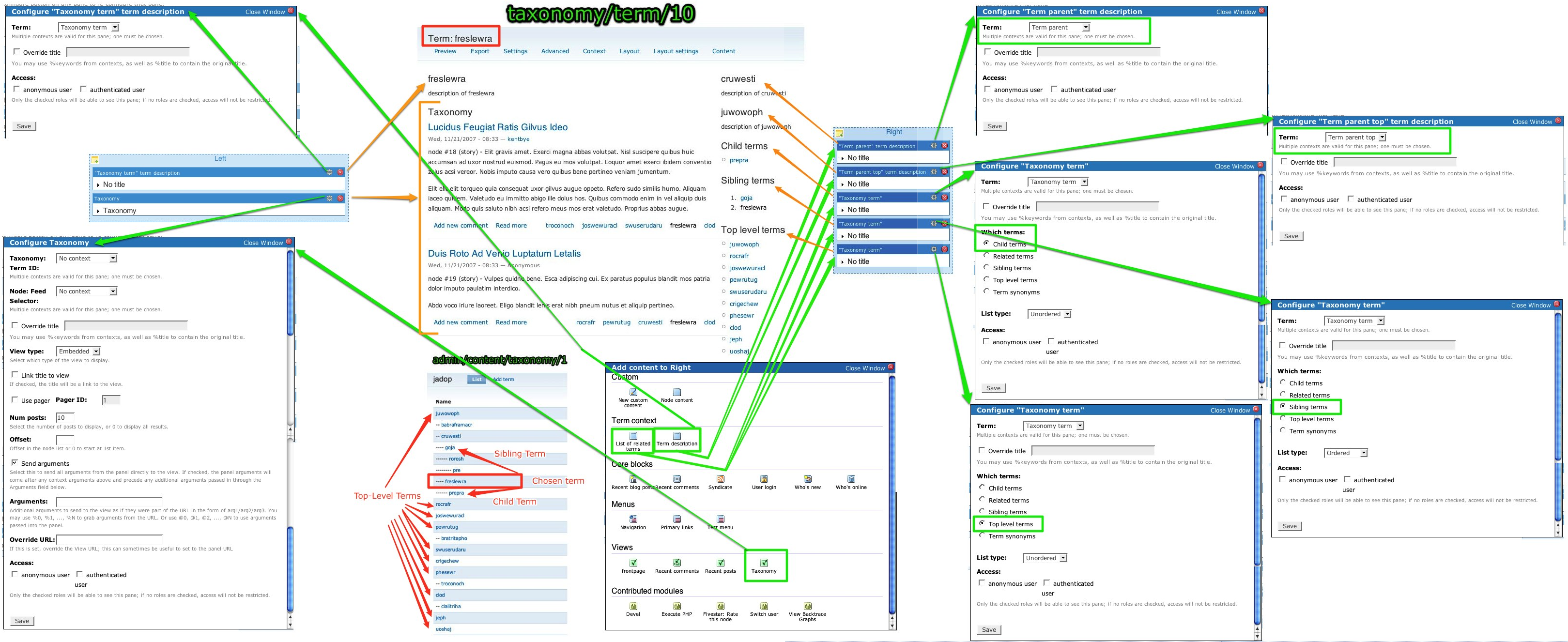
 

More details here: Panels: What is Context? & here.


The export code to recreate this panels scenario of overriding taxonomy/term/tid with contextual panels be found here: drupal.pastebin.com/f1bc881a3


Just copy & paste it from the box, add a new panels page, and then click import and paste it in. It helps to have some stock data with taxonomy terms created by the devel generate module.

Free download under CC Attribution (CC BY 4.0). Please credit the artist and rawpixel.com.

Collection of watercolor fruit paintings from the U.S. Department of Agriculture (USDA) Pomological Watercolor Collection. These fruit and nuts illustrations were created from 1886–1942 with 7,584 watercolor paintings. We have selected some of these incredible paintings and digitally enhanced them into high-resolution images. They are free to download under the CC0 license.

Higher resolutions with no attribution required can be downloaded: https://www.rawpixel.com/board/1241571/watercolor-fruit-painting-collection-free-cc0-public-domain-paintings?sort=curated&mode=shop&page=1


This is my second go at this wallpaper. Changed the drupal lettering to white upon request.

Rubus spectabilis (salmonberry) is a species of Rubus native to the west coast of North America from west central Alaska to California. In the Pacific Northwest of North America the berries can ripen from mid-June to early August. It is a shrub growing to 1–4 m tall, with perennial, not biennial woody stems (unlike other species) that are covered with fine prickles. The leaves are trifoliate with toothed leaf margins. The flowers are 2–3 cm diameter with five purple petals; they are produced from early spring to early summer. The fruit resembles a large yellow to orange-red raspberry 1.5–2 cm long with many drupelets.


Salmonberries are found in moist forests and stream margins, especially in the coastal forests. They often form large thickets, and thrive in the open spaces under stands of red alder (Alnus rubra).


In Kodiak, Alaska, orange Salmonberries are often referred to as "Russian berries". One of the islands in the Kodiak archipelago is named Raspberry Island because the berries are found in abundance there and look a lot like raspberries. Salmonberries are edible and share the fruit structure of the raspberry, with the fruit pulling away from its receptacle.


Twin Falls Trail, Snoqualmie WA

Jen Lampton, lead of the Twig initiative for Drupal, watches as Twig is committed to Drupal core live during the BADCamp 2012 keynote by Dries Buytaert, Drupal's project lead. The commit was the culmination of months of hard work by Jen and other contributors.

Our cake for the Drupal 5 Party

eyes the puppet with suspicion.

I guess this is why they call it fall.


I'm guessing under a walnut tree.


Near the Fountain Garden

Cantigny Park, Wheaton, Illinois 41.854053, -88.154825


September 29, 2020


COPYRIGHT 2020 by JimFrazier All Rights Reserved. This may NOT be used for ANY reason without written consent from Jim Frazier.


200929cz7-90531600

Love that Budzic by Sue Clark. You can find the step-out at Tangled Ink Art. I put it inside of Drupe for the Square One Focus tangle this week.

BlueMasters for Drupal is based on the BlueMasters PSD template, which was designed by Wendell Fernandes and released for Smashing Magazine and its readers.


BlueMasters has been ported to Drupal and is supported by More than Themes, as part of our ongoing effort to bring quality themes to Drupal.


Which other theme would you like to see ported to Drupal?

Let us know at www.drupalizing.com.


BlueMasters Live Demo


Features


- Custom front page with 4 block regions

- Footer with 4 block regions

- A total of 12 block regions

- implementation of a JS Slideshow

- CSS rules for


- Read More and Comment buttons

- Images into content or blocks

- Contact form

- 2-column layout for inner pages

- 3-column layout with a JS Slideshow for the front page


Follow us on Twitter.


///////////////////////////////////////////////


More themes

Apropos www.disambiguity.com/drupalorg-come-wireframe-with-me/.


This is the homepage, in case you couldn't guess. I forgot to include the site search, though. :(

Tangle in a tangle challenge #44

Tangle string is Drupe

Done on watercolor paper layered on scrapbook paper and cardstock.

I've started making cards from my challenge pieces.

The current home page of the localization server

Rocking Drupal at DrupalCamp LA 2010 - what a great group!

1 3 4 5 6 7 ••• 79 80